Home › Templates › Tenant ledger
Tenant Ledger Spreadsheet: Running Balances, Aging and Printable Statements
A tenant ledger is a dated list of everything charged to and received from one tenant: rent, other charges, payments, credits and refunds. Its job is simple — at any moment you should be able to say what a tenant owes (or is owed) and show exactly how you got there.
How a running balance works
Each row is either a charge (increases what the tenant owes) or a payment/credit (reduces it). The running balance is the previous balance plus the charge, or minus the payment. A fictional example:
| Oct 1 — Rent charge | +$1,500.00 → balance $1,500.00 |
| Oct 3 — Payment received | −$1,000.00 → balance $500.00 |
| Oct 7 — Late fee (only if your lease and local law allow one) | +$50.00 → balance $550.00 |
| Oct 15 — Payment received | −$550.00 → balance $0.00 |
Because the balance depends on row order, enter rows in date order. A ledger that is kept the same way for every tenant is also easier to explain if a question ever comes up.
What “aging” means
Aging splits an unpaid balance by how old the unpaid charges are, usually into buckets such as 0–30, 31–60, 61–90 and 91+ days. Our template treats payments as covering the oldest charges first, so whatever is still unpaid is aged from the newest charges backward. That convention is common in bookkeeping, but your lease or local rules may say how payments must be applied — check before relying on it.
Statements are records, not notices
A printable statement (opening balance, itemized lines, totals and ending balance for a date range) is a convenient way to share account activity with a tenant. It is a summary of your own records. It is not a demand letter, a notice to pay or quit, or any other legal document; those have their own requirements where you are.
Good habits for a clean ledger
- Record every charge and payment on the day it happens, with the date and method (check, transfer, etc.).
- Never delete a mistaken row — add a correcting entry so the history stays visible.
- Record returned payments and refunds as their own rows.
- Keep receipts and bank records that back up each entry.
The template
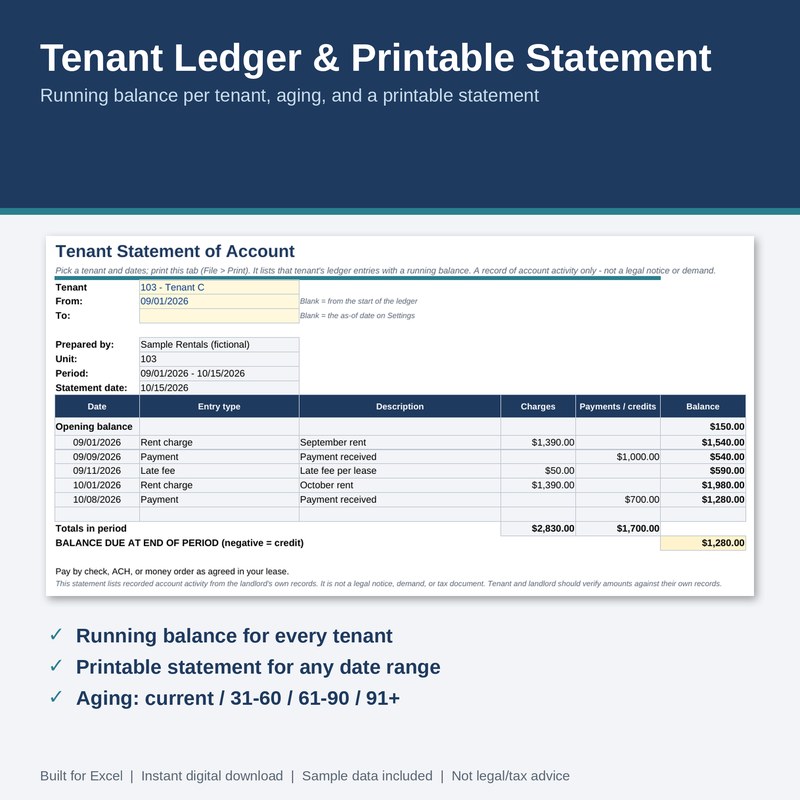
Tenant Ledger & Printable Statement — $14
- Up to 30 tenants with IDs and optional opening balances (owed or credit)
- 1,000 ledger rows for rent, late fees, payments, credits, returned payments and refunds, with automatic running balance and row checks
- Statement tab: pick a tenant and date range, then print
- Summary tab: balance, aging, last payment date and days since payment for every tenant
- Sample data, instructions, changelog, license, and a filled example copy
Tested: 16,356 automated checks against independently calculated results, 0 failures at version 1.0.0 (LibreOffice recalculation; download and open in Excel (.xlsx) or LibreOffice, then check it once against the sample data). Limits: 30 tenants, 1,000 rows, statements list up to 60 lines per tenant and range (totals always include every line); it does not add charges or late fees automatically.
Free download: Landlord Quick-Check
A free Excel (.xlsx) workbook: monthly rental cash flow and break-even rent, plus a late-fee and grace-period date calculator. Fictional sample data included; created with AI assistance and formula-tested.
Delivered through our Gumroad store, which asks for an email address at checkout, even for free items.
Related: free late-fee & grace-period calculator · Rent Roll & Late-Fee Tracker